Place email in Primary tab
The best way to ensure your emails appear in the Primary tab is to ask your subscribers to manually set this up in their Gmail account. There are three different ways your subscribers can ensure that an email will show in a specific tab.
Drag and Drop
The easiest way to move an email in your inbox is to left-click and hold on the email to drag it from the Promotions tab over to the Primary tab.
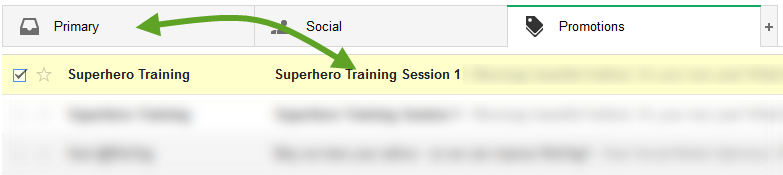
Release the mouse to drop the email into the newly selected tab. Once dropped, Gmail displays a yellow box that asks if you want to make this change permanent. Click Yes to ensure that all messages with the same From email address appear in the Primary tab going forward.

Right-Click
Similar to the drag-and-drop option, right-click on the email in some browsers to bring up a small list of options. Click the Move to tab option and select the tab you want to move the email to.

A yellow box will display that asks if you want to make this change permanent. Click Yesto ensure that all messages with the same From email address will appear in the Primary tab going forward.